What Is Time to Decimal?
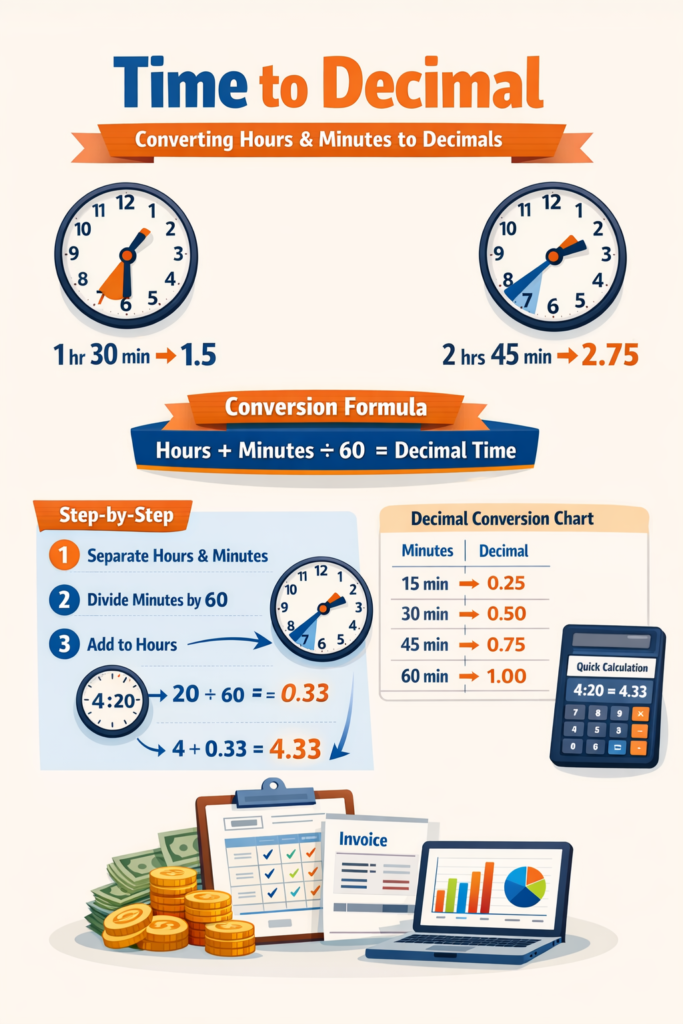
Time to decimal is the process of converting standard time — written in hours and minutes — into a single decimal number. Instead of writing 1 hour and 30 minutes, you write 1.5. Instead of 2 hours and 45 minutes, you write 2.75.
This format exists because decimal numbers are far easier to calculate with. Adding 1.5 and 2.75 takes one second. Adding 1 hour 30 minutes and 2 hours 45 minutes requires you to carry values across a base-60 system, which slows everything down and invites mistakes.
Most payroll systems, billing platforms, and time tracking tools store time in decimal format for exactly this reason. Once you understand how the conversion works, you will find it useful in dozens of everyday professional situations.
The Time to Decimal Formula
Every time to decimal conversion comes down to one formula.
Decimal Time = Hours + (Minutes ÷ 60)
The logic behind it is straightforward. An hour has 60 minutes, so each minute is worth 1/60th of an hour. When you divide the minutes by 60, you get the decimal fraction of the hour they represent. You then add that fraction to the whole hours you already have.
For example, to convert 3 hours and 45 minutes: divide 45 by 60 to get 0.75, then add it to 3. The result is 3.75 hours.
This formula works for any time value, whether it is 10 minutes or 59 minutes. The key thing beginners often get wrong is dividing by 100 instead of 60. Time does not work in base 10 — it works in base 60 — so the divisor must always be 60.
How to Convert Time to Decimal Step by Step
Converting any time value follows three simple steps.
First, separate your hours and minutes. If your time is written as 4:20, identify 4 as the hours and 20 as the minutes.
Second, divide the minutes by 60. In this case, 20 ÷ 60 = 0.333, which rounds to 0.33.
Third, add that result to your hours. So 4 + 0.33 = 4.33 hours.
That is the complete process. There is nothing more to it. The only place people stumble is with rounding — for most professional purposes, rounding to two decimal places is accurate enough. However, if you are processing large payrolls where small differences accumulate, using a calculator that handles the full decimal is the safer approach.
If you want to skip the manual steps entirely, the Time to Decimal Calculator on this site does the conversion instantly. You enter the hours and minutes, and it returns the exact decimal value in one click.
Time to Decimal Conversion Chart
For common minute values, the chart below gives you the decimal equivalent at a glance. This is useful when you are working through timesheets quickly and just need to look up a value rather than calculate it.
| Minutes | Decimal | Minutes | Decimal |
| 5 | 0.08 | 35 | 0.58 |
| 10 | 0.17 | 40 | 0.67 |
| 15 | 0.25 | 45 | 0.75 |
| 20 | 0.33 | 50 | 0.83 |
| 25 | 0.42 | 55 | 0.92 |
| 30 | 0.50 | 60 | 1.00 |
Four values are worth memorizing because they cover the most common rounding points in any workday: 15 minutes equals 0.25, 30 minutes equals 0.50, 45 minutes equals 0.75, and 60 minutes equals 1.00. If you know these four, you can estimate any time value quickly without looking anything up.
Where Time to Decimal Conversion Is Used
Payroll and Salary Calculations
Payroll is the most common professional use case for time to decimal conversion. When a company pays hourly wages, it needs to multiply hours worked by the hourly rate. That multiplication only works cleanly when hours are expressed as a decimal number.
Consider an employee who worked these hours across a week: Monday 8 hours 30 minutes, Tuesday 7 hours 45 minutes, Wednesday 9 hours 15 minutes, Thursday 8 hours, and Friday 6 hours 20 minutes. In decimal format these become 8.50, 7.75, 9.25, 8.00, and 6.33, giving a weekly total of 39.83 hours. Multiply by any hourly rate and you get an exact wage figure. Trying to do the same arithmetic with mixed hours and minutes is slower and more likely to produce errors.
For a detailed walkthrough of payroll-specific conversions, the Payroll Time to Decimal Conversion Guide covers everything HR professionals and small business owners need.
Freelance Billing and Client Invoices
Freelancers working on hourly rates need accurate decimal time to generate correct invoices. If you spent 2 hours and 40 minutes on a client project, that is 2.67 hours. Multiply by your rate and you have the exact amount to bill. Rounding to 2 or 3 hours would either shortchange you or overcharge the client.
The same logic applies when tracking time across multiple clients in a single week. Decimal values make it easy to sum everything up and break out what each client owes. The Freelancer Billing and Time Tracking Guide explores this use case in more depth.
Time Tracking and Timesheets
Most modern timesheet software stores entries in decimal format behind the scenes, even if it displays them as hours and minutes on screen. Understanding the underlying decimal values helps you catch errors in automated systems and verify that totals are being calculated correctly.
If your company uses manual timesheets, entering decimal values directly is faster and reduces transcription mistakes. The Timesheet Decimal Format Guide explains how to set this up in practice.
Excel and Spreadsheet Calculations
Excel has its own internal time format, but for arithmetic purposes, converting time to decimal first is almost always the cleaner approach. The formula =HOUR(A1) + MINUTE(A1)/60 converts any standard time cell into its decimal equivalent, after which you can multiply, sum, and average freely.
For a full set of Excel-ready formulas and downloadable templates, see Time to Decimal in Excel.
Common Mistakes When Converting Time to Decimal
Dividing by 100 Instead of 60
This is the single most common error, and it produces results that look plausible but are consistently wrong. If someone converts 30 minutes as 30 ÷ 100 = 0.30 instead of 30 ÷ 60 = 0.50, they are understating every time value that contains minutes. In a payroll context, this means employees are being underpaid. In a billing context, it means the freelancer is undercharging. Always divide by 60.
Ignoring the Minutes Entirely
When time values are close to a whole hour, some people round to the nearest hour and drop the minutes. For a single entry this might seem harmless, but across 20 or 30 entries in a timesheet it creates a meaningful error. A 15-minute difference is 0.25 hours, and at a rate of $50 per hour that is $12.50 per entry. It adds up.
Rounding Too Aggressively
Some people round 0.333 to 0.3 rather than 0.33. Again, this seems small but compounds across many entries. Two decimal places is the standard for professional use. Three decimal places is more precise but rarely necessary.
Confusing Decimal Hours with Decimal Minutes
A time displayed as 2.5 means 2 hours and 30 minutes, not 2 hours and 50 minutes or 2 hours and 5 minutes. The decimal represents a fraction of an hour, not a minute count. This confusion is especially common when reading reports generated by time tracking apps that display values without clear labels.
How to Convert Decimal Back to Hours and Minutes
Sometimes you need to go the other direction — from decimal to standard time. This comes up when presenting data to someone unfamiliar with decimal time, or when working with systems that display HH:MM format.
The reverse process is just as simple. Take the whole number as your hours. Multiply the decimal portion by 60 to get your minutes.
For example, 3.75 hours: the whole number is 3 hours, and 0.75 × 60 = 45 minutes, giving you 3 hours and 45 minutes. For 5.33 hours: 5 hours, and 0.33 × 60 = approximately 20 minutes, giving 5 hours and 20 minutes.
The Decimal to Time Conversion Guide covers this process in full, including how to handle values that do not round to clean minute figures.
Manual Calculation vs. Using a Calculator
For occasional use, the manual formula is perfectly adequate. You divide the minutes by 60, add the result to the hours, and you are done. This works fine if you are converting one or two values.
For regular professional use — weekly timesheets, client billing, payroll processing — manual calculation introduces unnecessary risk. A single arithmetic slip can affect multiple downstream calculations, and checking your work takes almost as long as doing it again from scratch.
The Time to Decimal Calculator on this site is built specifically for this kind of regular use. It handles the division and rounding automatically, works on mobile and desktop, and requires no account or login. If you are processing time values more than a few times a week, using the calculator rather than doing it by hand is simply the more practical choice.
Practical Examples
To make this concrete, here are three real-world scenarios showing the full conversion process from start to finish.
Scenario 1 — Weekly Payroll: An employee logs 8:45 on Monday, 7:30 on Tuesday, 9:00 on Wednesday, 8:15 on Thursday, and 7:45 on Friday. Converting each entry: 8.75, 7.50, 9.00, 8.25, and 7.75. Total: 41.25 hours. At an hourly rate of $18, the gross pay is $742.50.
Scenario 2 — Freelance Invoice: A designer worked 1:40 on a logo project, 2:20 on revisions, and 0:50 on client calls. Converting: 1.67, 2.33, and 0.83. Total: 4.83 hours. At $75 per hour, the invoice total is $362.25.
Scenario 3 — Project Estimation: A development team tracked time on a sprint. Research took 3:30, design took 5:15, development took 11:45, and testing took 4:20. Converting: 3.50, 5.25, 11.75, and 4.33. Total sprint time: 24.83 hours, which the project manager records as approximately 25 hours for the next planning cycle.
Frequently Asked Questions
What is 45 minutes in decimal? 45 divided by 60 equals 0.75. So 2 hours and 45 minutes is 2.75.
What is 1 hour 30 minutes in decimal? 1 plus (30 divided by 60) equals 1.50.
Why do we divide by 60 and not 100? Because time is measured in base 60. There are 60 minutes in an hour, so each minute is 1/60th of an hour, not 1/100th.
What is 0.5 hours in minutes? 0.5 multiplied by 60 equals 30 minutes.
What is 0.25 hours in minutes? 0.25 multiplied by 60 equals 15 minutes.
Is decimal time the same as military time? No. Military time refers to the 24-hour clock format. Decimal time refers to expressing hours and minutes as a single decimal number.
What is the fastest way to convert time to decimal? Using an online calculator. The Time to Decimal Calculator on this site gives you the result in one click without any manual arithmetic.
Final Thoughts
Time to decimal conversion is one of those skills that seems minor until you start using it regularly, at which point it becomes essential. The formula is simple — hours plus minutes divided by 60 — but applying it consistently and accurately across timesheets, invoices, and payroll records is where most people need a reliable tool rather than a manual process.
The guides linked throughout this article go deeper on each specific use case. Whether you are managing payroll for a team, billing clients as a freelancer, or building time-based reports in Excel, each guide picks up where this one leaves off.
For immediate conversions, the Time to Decimal Calculator is the fastest place to start.