Most People Get This Wrong Without Even Realizing It
You tracked your work hours carefully. You wrote down 7 hours and 45 minutes. Then you multiplied it by your hourly rate and got a number that felt slightly off.
The problem was not your math. The problem was the format.
Standard time and decimal time are two different things, and mixing them up causes calculation errors that quietly cost businesses and freelancers real money every week. Understanding how hours to decimal conversion works fixes that problem permanently.
This guide walks you through exactly what the conversion is, why it matters, and how to do it correctly every time.
What Is Hours to Decimal Conversion?
Hours to decimal conversion means expressing time as a single decimal number instead of the traditional hours-and-minutes format.
In everyday life, you write time like this: 2:30, meaning 2 hours and 30 minutes. But in a decimal time clock system, that same value is written as 2.5. Both represent the same length of time. The difference is that 2.5 is immediately usable in any calculation, while 2:30 requires an extra conversion step before the math works.
The reason this matters is simple. Standard time runs on base 60 — there are 60 minutes in an hour. Decimal numbers run on base 10. When you multiply 2:30 by a dollar amount, your calculator treats the 30 as 30 hundredths of an hour instead of 30 sixtieths. That gives you a wrong answer. Converting to decimal first removes the problem entirely.
Why Convert Hours to Decimal?
The short answer is accuracy. Any time you multiply or divide a time value, decimal format gives you a correct result where the standard format does not.
Beyond accuracy, decimal time is simply faster to work with. Adding four decimal values together takes a moment. Adding four values in hours-and-minutes format requires you to carry values across a base-60 boundary, which slows everything down and creates room for error.
There is also a compatibility reason. Most payroll software, invoicing platforms, and spreadsheet formulas expect time in decimal format. If you enter 7:45 into a payroll decimal calculator that expects 7.75, the output will be wrong. Understanding the conversion means you can work confidently with any of these tools.
Where Is Hours to Decimal Conversion Used?
This conversion shows up in more places than most people expect.
Payroll processing is the most common application. When HR teams calculate weekly wages, they convert every employee’s time card decimal values before multiplying by hourly rates. A single unconverted entry can throw off an entire paycheck.
Freelance invoicing relies on it just as heavily. A freelancer who worked 3 hours and 20 minutes on a project needs to bill for 3.33 hours, not 3.20. The difference on a $100 hourly rate is $13 — meaningful across dozens of monthly invoices.
Project management uses decimal hours to track how long tasks actually take versus how long they were estimated to take. Decimal values make variance analysis straightforward.
Excel and Google Sheets both handle decimal hours much more cleanly than formatted time values. Most time-based formulas in spreadsheets assume decimal input, which is why the time clock decimal converter step often happens before data gets imported.
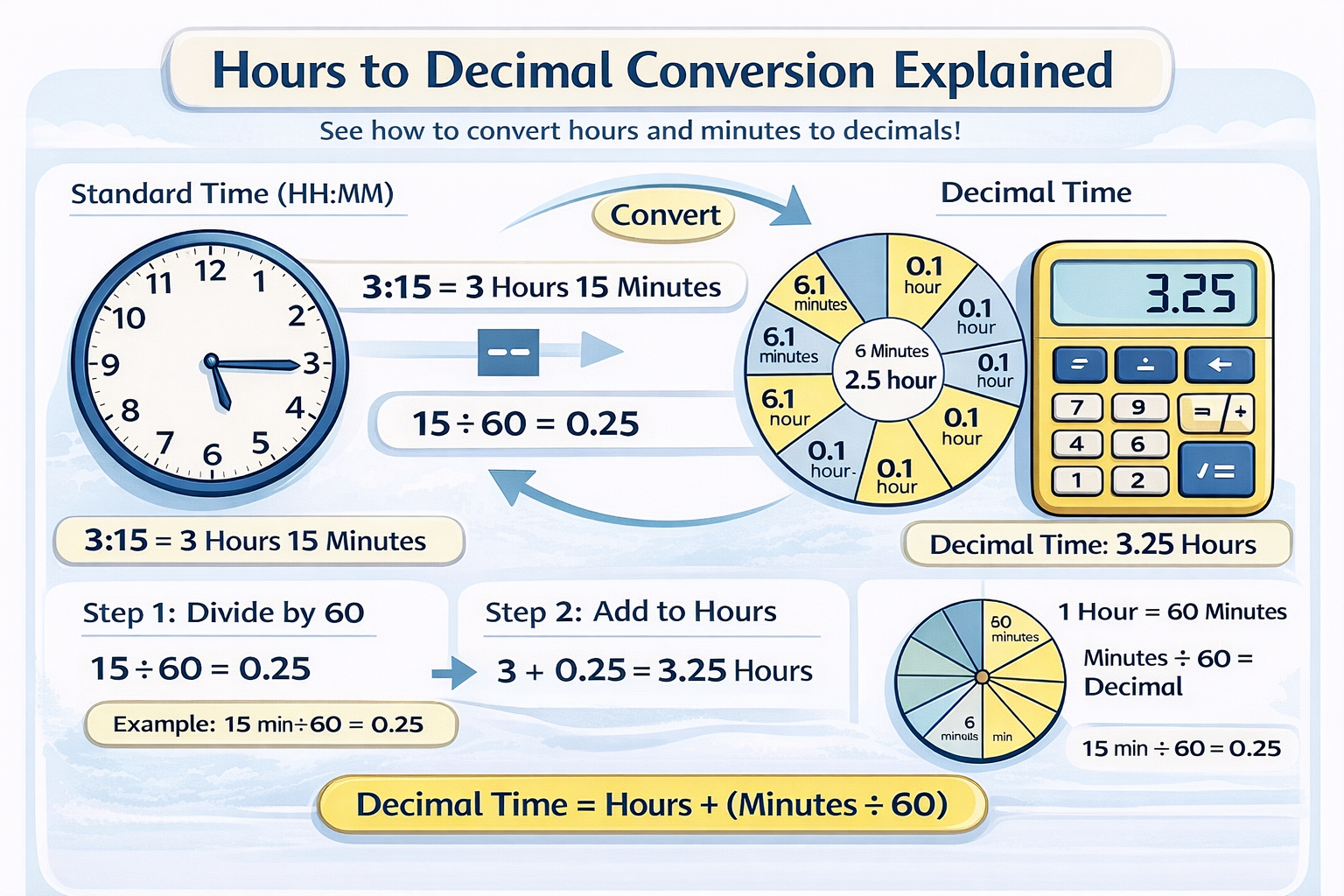
How to Convert Hours to Decimal: Step by Step
The process has three steps and takes about ten seconds once you have done it a few times.
Step 1: Write down your hours and minutes separately. If your time is 4:40, that is 4 hours and 40 minutes.
Step 2: Divide the minutes by 60. In this case, 40 ÷ 60 = 0.667, which rounds to 0.67.
Step 3: Add that result to your hours. So 4 + 0.67 = 4.67 hours.
That is the complete process. The only rule to remember is that you always divide by 60, not by 100. Minutes are sixtieths of an hour, not hundredths.
The Formula Behind the Conversion
For anyone who wants to understand the underlying math, the formula is clean and simple.
Decimal Hours = Whole Hours + (Minutes ÷ 60)
Nothing more to it. The whole hours stay exactly as they are. Only the minutes get converted, and they convert by dividing by 60 because that is how many minutes make up one full hour.
If you want to go in the other direction — converting a decimal number back to hours and minutes — the reverse formula works like this: take the decimal portion and multiply it by 60. So 4.67 hours becomes 4 hours and (0.67 × 60) = approximately 40 minutes.
For a deeper look at the full conversion process in both directions, the time to decimal complete guide covers every scenario you are likely to encounter.
Real-Life Examples
Seeing the formula in action makes it click faster than any explanation.
Example 1: You worked 1 hour and 30 minutes. 1 + (30 ÷ 60) = 1 + 0.5 = 1.5 hours
Example 2: A project took 2 hours and 45 minutes. 2 + (45 ÷ 60) = 2 + 0.75 = 2.75 hours
Example 3: An employee’s shift was 8 hours and 20 minutes. 8 + (20 ÷ 60) = 8 + 0.333 = 8.33 hours
Example 4: A freelancer logged 0 hours and 50 minutes on a short task. 0 + (50 ÷ 60) = 0.83 hours
In each case, the decimal version is immediately ready for multiplication. If the freelancer in Example 4 charges $60 per hour, the invoice amount is 0.83 × $60 = $49.80. Try doing that calculation with “50 minutes” and your calculator will give you the wrong number.
Benefits of Using an Online Decimal Clock Calculator
Manual conversion is reliable once you understand the formula. However, when you are processing multiple entries — say, a full week of employee timesheets — doing each one by hand is slow and introduces human error.
An online decimal clock calculator handles the arithmetic instantly. You enter the hours and minutes, and you get the decimal value in one click. This means you do not have to calculate manually, check your work, or worry about whether you rounded correctly.
The right tool also reduces the risk of the most common mistake in this process, which is dividing by 100 instead of 60. That error produces values that look reasonable but are consistently slightly wrong. A properly built time card decimal tool uses the correct formula every time without you having to think about it.
If you are working with time data regularly, the time to decimal calculator is the most practical way to handle conversions quickly and accurately.
Conclusion: Small Conversion, Big Difference
Converting hours to decimal is one of those things that seems minor until you see what happens without it. Payroll errors, incorrect invoices, spreadsheet formulas that quietly return wrong answers — most of these trace back to the same root cause: time values that were never properly converted.
The fix is simple. Divide your minutes by 60, add the result to your hours, and you have a decimal value that works correctly in any calculation. For regular use, an online convert number to time tool removes even that small step.
Once you start working in decimal time consistently, you will notice that your calculations become faster, your results become more accurate, and the small discrepancies that used to creep into your numbers simply disappear.
Start with the formula. Build the habit. And when volume or speed matters, let the calculator do the work.